LIVE FROM THE DESKONE PHOTO. FULL BAND.NO REHEARSAL · 14 SECONDS
100% UNREHEARSED✦
TINY DESK TURN IT UP.
THE OUTSTANDING TINY DESK AI TREND
Outstanding Tiny Desk AI Video Generator
One photo. You’re at the desk. The band can’t keep a straight face.
Pick a desk template, add one clear photo and generate a silent 14-second clip. Step into the band, choose 9:16 or 16:9, then add a trending sound when you post.
5 DESK TEMPLATESONE PHOTO14 SECOND CLIPS9:16 OR 16:9
OUTSTANDING TINY DESK AI ✦ ONE PHOTO ✦ LIVE FROM THE DESK ✦ SILENT 14-SECOND CLIP ✦ ADD THE SOUND WHEN YOU POST ✦OUTSTANDING TINY DESK AI ✦ ONE PHOTO ✦ LIVE FROM THE DESK ✦ SILENT 14-SECOND CLIP ✦ ADD THE SOUND WHEN YOU POST ✦
01 / THE WORKSPACE
Step up to the desk.
Your template. Your photo. Your next Outstanding Tiny Desk AI video starts here.
Friends, teammates, coaches and five complete strangers. Every template is a full performance — preview the reference clip, then put yourself in the room.
Choose the room, the band and the camera move that fit the video you want to make. Five templates, five different energies.
02
Drop one photo.
A clear, front-facing portrait is enough. The template sets the length, you pick the resolution and the frame, and the exact credit cost is shown before you start.
03
Post it. Add the sound.
The clip comes back silent and 14 seconds long. Add a licensed or trending sound when you publish, and let the performance land.
ONE DESK. FIVE ROOMS. ZERO REHEARSAL.
FOR THE ENCORE
Your camera roll. Now with a sax solo.
Some photos belong in an album. Yours might belong behind a tiny desk. Make an Outstanding Tiny Desk AI video with a laughing band, a borrowed lamp and a chorus nobody rehearsed.
One capable video model
Our video model runs every take. Duration and resolution set the credit estimate.
Every kind of frame
Vertical stories, square posts or a wider cinematic perspective.
A photo note for every desk
Each template explains the framing it needs, so a good take starts with a good portrait.
What is the Outstanding Tiny Desk AI video generator?
+
It is a photo-to-video workflow for the Tiny Desk AI trend: one photo puts you behind the desk while the band, the room and the sax solo come from a reference clip. Pick one of five desk templates, add a portrait and create a silent 11 or 14-second clip. Tiny Desk AI is an independent tool and is not affiliated with NPR or the Tiny Desk series.
How many photos do I need?
+
One. Every Tiny Desk template uses the first slot. Put the person who should lead the performance in that slot — clear, front-facing and well lit works best.
Do I need to write a prompt?
+
No. Each desk template ships with its own built-in motion and length. Add your photo, choose the frame and generate. There is nothing to write.
How long is the video, and can I choose the length?
+
The template decides the length. Each desk clip runs 11 or 14 seconds and the render follows it, because the template video is uploaded as the reference for your run. You choose the resolution and the frame — vertical 9:16, square 1:1 or landscape 16:9, at 768P or 2K — and the exact credit cost is shown before you start.
Will the result still look like me?
+
The model keeps the face, hair and outfit from your photo. A clear, front-facing, evenly lit portrait keeps the most detail. A second face in the frame is ignored rather than blended in.
Does the video include music?
+
No. Every clip is delivered silent. Add a licensed or trending sound in TikTok, Reels or Shorts when you post — that is how the Tiny Desk trend travels.
Can I upload a photo of someone else?
+
Only with their consent. Use photos of yourself, or of people who have agreed to appear in your video. Photos of celebrities and public figures are rejected.
What does it cost, and what if a render fails?
+
The price depends on the model, resolution and clip length. The generate button shows the exact credits before you start, and the server looks the total up. A failed run refunds the credits automatically, so you only pay for finished files.
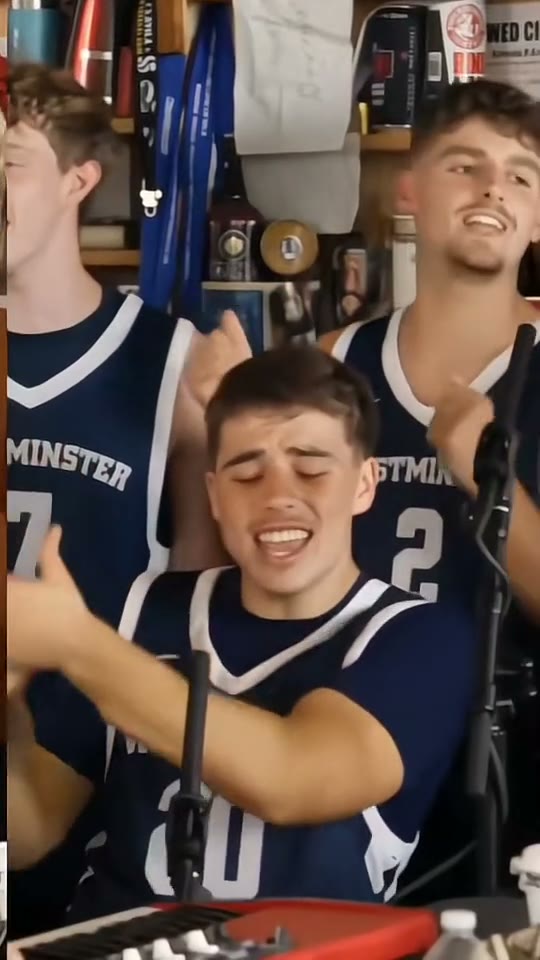 ONE DESK. FIVE ROOMS. ZERO REHEARSAL.